Configuration
REX and M2EX include a number of extra configuration options compared with the vanilla games.
Main Menu Options
Section titled “Main Menu Options”Graphics Settings
Section titled “Graphics Settings”New options are available in the graphics options menu for some graphics settings (highlighted red in M2EX). For example the “Extreme” settings.
These push the graphical detail far beyond what the games were capable of before, but can come at a significant cost to performance. You can test these out and see what your PC can handle.
Modern WASD Control Scheme
Section titled “Modern WASD Control Scheme”In Options > Keyboard Settings, click the right arrow to change from “Total War Style Setup” to “FPS Style Setup”.
In-game options
Section titled “In-game options”While playing, you will find a number of new gameplay and graphical configuration options.
Unit Movement Run Mode
Section titled “Unit Movement Run Mode”While playing, go to Options > Game Options.
This controls whether units walk (as in vanilla) or run. By default, this is set so they run when you drag out a formation.
New Camera and Tilt Options
Section titled “New Camera and Tilt Options”While playing, go to Options > Camera Options.
By default, the Camera Mode is set to RTS Camera, which is REX/M2EX’s much improved camera.
Select No Camera Tilt if you want to disable tilting when you zoom in and out.
Unit cards and icons on highlight
Section titled “Unit cards and icons on highlight”While playing, go to Options > Video Options.
These determine if you see little icons and unit cards when you hold the highlight key (this defaults to space bar)
Unit Silhouettes
Section titled “Unit Silhouettes”While playing, go to Options > Video Options.
This controls whether blue/red silhouettes of friendly and enemy units appear through obstacles, such as trees or terrain, enhancing visibility.
Range Indicator
Section titled “Range Indicator”While playing, go to Options > Video Options.
This controls whether a range circle is drawn around selected ranged units, showing how far they can shoot (depending on terrain etc).
This indicator can be customised further in the Advanced Configuration Files
Blood Pools
Section titled “Blood Pools”While playing, go to Options > Video Options.
This controls whether pools of blood are created around dead soldiers.
Advanced Configuration Files
Section titled “Advanced Configuration Files”Certain options are not currently available to tweak within the game. These can be found in text files in the data folder, such as: descr_ex.txt and descr_caps_ex.txt.
Note that these files will be overwritten every time you install a new release, so it’s recommended to keep a note/backup of the values you changed and re-add them after upgrading to a new version.
Certain especially useful options are noted below (but the files have comments to explain each setting and what it does):
descr_ex
Section titled “descr_ex”This section allows you to customise the look of the range indicators:
;;;;;;;;;;;;;;;;;;;;;;;;;;;;;;;;;;;;;;;;;;;;;;;;;;;;;; Battle range indicator;;;;;;;;;;;;;;;;;;;;;;;;;;;;;;;;;;;;;;;;;;;;;;;;;;;;;A more subtle red range indicator configuration (closer to other Total War games) would be:
; Disc colour, r g b (0-255)range_indicator_colour 255 0 0
; Alpha at the edge (0-1)range_indicator_peak_alpha 1
; Alpha of the inside (0-1)range_indicator_floor_alpha 0
; Inward fade width from the edge as a fraction of the radius (0-1)range_indicator_falloff 0.015
; Outer-edge softness; small = crisp (0-1)range_indicator_fuzz 0.008
blood_pool_limit allows you to set maximum blood pools on the battlefield.
corpse_limit allows you to set how many corpses are allowed before the oldest ones are removed for performance reasons.
show_unit_card_always allows you to set unit cards and icons to appear at all times (and there are other options next to it allowing further customisation).
descr_caps_ex
Section titled “descr_caps_ex”fog_of_war_shroud - Allows you to change whether fog of war in REX is black or vanilla (grey).
faction_unlock - Allows you to change whether all factions are unlocked for the campaign straight away or revert to vanilla progression.
descr_sm_factions
Section titled “descr_sm_factions”You can use this file to add internal province borders on the campaign mini-map, by adding a tertiary_colour to each faction.
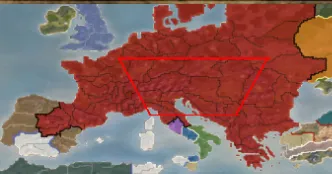
For example:
tertiary_colour red 0, green 0, blue 0Visibility of arrows
Section titled “Visibility of arrows”REX/M2EX makes arrows brighter than they are in vanilla by default.
descr_projectile_new.txt (REX) and descr_flaming_projectiles.txt (M2EX) allow you to customise this.
An example from the REX file for the parameters -
;<far> <mid> <length_cap> <whiten_cap> <whiten_gain>distance_visibility 0.05 0.10 2.0 0.19 0.0007If you would like to revert the look back to vanilla, set the “distance_visibility” lines in the files to:
distance_visibility 0 0 1 0 0